
Checked in the game for this version, so voting is closed.
Residents are the workforce of your production buildings. Build Dorms for beds and tap Welcome in when a raft arrives. They fill empty work slots on their own.
Capacity#
- The HUD shows
residents/capacitywith a face icon, right after the clock. - Capacity comes from the Dorms. Here's how it grew for us:
- 4/4 at the start.
- 4/6 with Dorm 1, then 4/7 with Dorm 1 Lv.2.
- 9/9 after Dorm 2.
- 9/14 with Dorms 3, 4, and 5.
- When you're full, a resident complains: "Freezing out here… Could we get a few more beds?" A recruitment raft then waits near the shelter.
New residents arriving#
- A small raft with survivors pulls up to the shelter. It shows a bubble with a face and a green "+".
- Tap the bubble. The survivor speaks ("Please... we need somewhere safe.").
- The "Residents have arrived!" window opens with their portraits: "N resident(s) appeared outside your Shelter, hoping to be taken in!"
- Tap Welcome in (green button) to take them all. Marcus confirms: "Welcome. Out here, every person counts."
Named residents we've seen:
- At the start: Marcus, Walter, Emily, and Andy.
- On rafts: Charlotte, John, Tommy, Mike, and Oscar.
- On the chapter 3 raft: Lucy (a nurse), a wounded man bitten by a shark, and Allen (a hero).
- Winston, an old engineer. He's probably the wounded man (hypothesis).
Oscar: after Andy was taken, the shelter was at 8/9. A raft brought Oscar ("1 resident(s) appeared outside your Shelter…"). Welcome in brought it to 9/9. Later, another raft showed up while the shelter was full (9/9).
We got an error [100] right after taking people in. The game then showed the window again with a different group (Charlotte, Tommy, Mike), and the earlier action was lost. Always check the HUD counter after you welcome someone.
Assigning residents to buildings#
- Buildings with a free slot show a silhouette bubble (a person). Tap it to open the panel on the residents tab.
- The residents tab shows Vacant slots (+), locked slots (they open at higher levels), and a
0/1counter with − and + buttons. The hint reads "Assign a resident to work". - Tap + and a resident is assigned on their own. They walk along the walkway to work ("Finally a break… for now").
- Portraits show up in the slots (Marcus and Charlotte at the Oil Plant).
- Auto-fill (confirmed): new residents fill free building slots on their own. When we took Oscar in, the slot bubbles went away.
- After Dorms 3–5, the rafts brought residents who filled the Iron Foundry slots (3/3). Slots stay free only when the shelter is full.
- With no idle resident, the
+on a building doesn't raise the count. It only swaps one worker for another (Lumber Mill Lv.5, shelter at 14/14). - Slots open with the first furniture piece and with each building level (Oil Plant: 1 slot at Lv.1, 2 at Lv.2). See Buildings and city growth.
- Production ready = a bubble with the resource icon above the worker (a log, a barrel).
Worker slots and new residents#
We saw this flow on November 18, 2026, with the HUD population at 14/16.
- Buildings with a white silhouette bubble have a free worker slot. Examples: the Oil Plant and the Lumber Mill.
- Tap the bubble to open the building's workers tab. For example: Lumber Mill Lv.5 with Marcus, Mike, and "Vacant", a 2/3 counter, and −/+ buttons.
- With no free survivor, tap the Vacant slot. The camera moves to the raft with the new survivor (a bubble with a face and a green "+").
- Tap the raft bubble. A window opens with the Welcome in button: "Residents have arrived! 1 resident(s) appeared outside your Shelter…"
- The game also tells you with the notice "New survivors have arrived at the camp".
Silhouette bubble → Vacant → raft bubble → Welcome in. That's a direct way to fill an empty slot.
Health, rest, and mood#
- Dorm furniture gives health (heart icon; Bed: 17.5 → 18) and mood (smile icon; Sofa: 10.5 → 11).
- The Kitchen is "boosting morale and productivity".
- Vertical bars above residents' heads (red or green) with a heart icon show their health. We confirmed this on the Lighthouse panel.
- The Infirmary treats sick residents ("Sick residents are treated here and restored to health.").
- Day and night cycle: the HUD clock goes through sun (day), moon (night), and zZ (sleep). Residents rest in the Dorms at night. See Interface and HUD.
Chatter#
Residents show random speech bubbles over the scene. They're decoration, but they cover part of the screen. Some examples:
- "Still breathing. That's enough."
- "Love weather like this."
- "Seaweed without that engine oil smell... miracles do happen."
Two lines mean you're short on food: "I'm starving!" and "I could eat a horse right now!"
That time, the only food came from the Fisherman's Hut Lv.2. These lines aren't decoration: it's time to raise food production.
Story events#
- Andy is taken by a jet ski in chapter 4. Residents drop from 9/9 to 8/9.
Open questions#
- [x] What do the bars above residents mean? — Health (heart icon).
- [ ] Do residents get sick on their own? When their health drops, do they go to the Infirmary?
- [x] Do new residents fill free slots on their own? — Yes.
- [ ] Are residents different from each other (stats, specialties)?
- [ ] Is there a limit to recruitment rafts, or do they keep coming?
- [ ] The number effect of health (heart) and mood (smile) on production.
Resident portraits (game files)#
Half-body and square portraits (the square ones are in Game gallery).
Resident names come from a separate list in the game's text files (Alexander, Benjamin… Alice, keys 2500–2541). They are not linked to a portrait in the files, so the captions use only the id.
Story characters (Marcus, Walter, Emily, Andy, Lucy…) have their own names in the text files (keys 6061–6070).

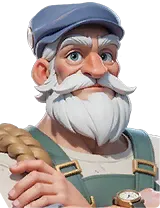




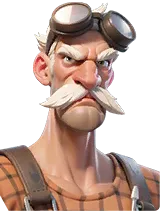
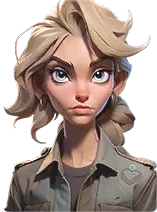





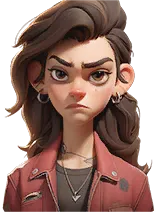



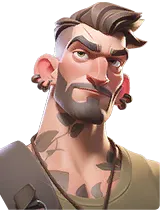
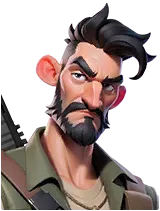

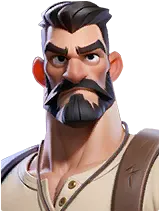


Original infobox screen:

Related#
- Dorm
- Infirmary
- Buildings and city growth
- Resource production and management
- Game gallery#Residents (portraits)
- Furniture
Last updated#
Android 1.8.0 (November 18, 2026).
Last updated:
Discussions
No forum topics about this page yet.
Discuss this page